1
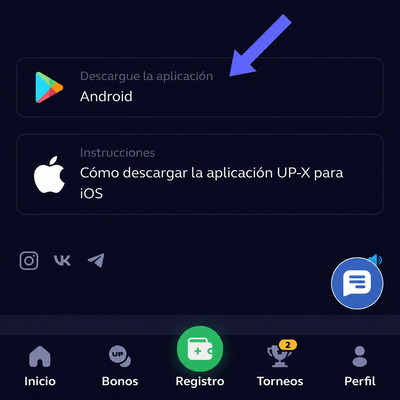
Open the download page
Open the page in your phone browser and press the download button for your device.
The UP X app provides convenient mobile access with an interface adapted to smaller screens. This page explains how to download, install and keep the app updated.
The guide covers Android, iPhone and computer options. Before starting the download, check the operating system and available storage on your device.

The process is completed in three stages. The images show the general path from downloading the file to opening the app.
Open the page in your phone browser and press the download button for your device.
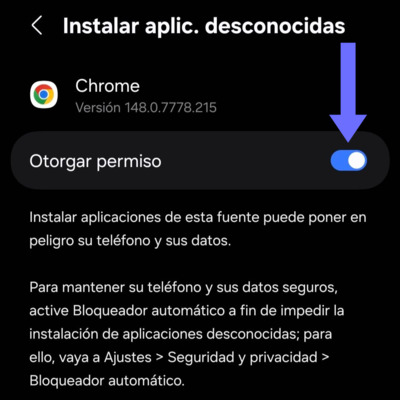
Open the downloaded file and confirm the installation. On Android, you may need to temporarily allow this action in the settings.
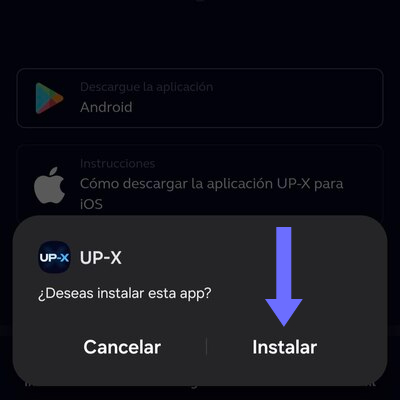
When the installation is complete, launch the app from the icon created on the screen and sign in with your usual details.
The Android mobile version is distributed as an APK file. To begin, open this page on your phone, press the download button and wait for the file to finish saving. The required time depends on connection speed and available storage.
Before installing the UP X app, confirm that the filename matches the application and that the download has completed. Then open the APK from the browser notification or the Downloads folder. Android will display a confirmation screen with the required permissions.
If the system blocks the installation, open the security settings and allow apps to be installed from the browser you are using. This option may appear as “install unknown apps.” Enable it only to complete the process and disable it again after the app has been installed.
When finished, the UP-X icon will appear alongside the other apps. You can log in with an existing account or continue registration from the same device.
On iPhone, the mobile experience works through Safari and adapts to the screen size. Open the platform, tap the Share menu and select “Add to Home Screen.” Access will then be available as an icon, similar to an installed app.
This method does not require downloading an APK or changing iOS security settings. The shortcut opens the current version of the platform, so it uses less space than a conventional app and does not require manual installation.
For stable access, use a recent version of iOS, allow the necessary cookies and avoid private mode when you want to keep the session. If the icon stops opening correctly, delete the shortcut and create it again from the current page.
The mobile interface keeps the main functions, category navigation and account area. The same access can be used on iPhone and iPad, while Android users can choose between the installed app and the web version.
On Windows, macOS or Linux, installing additional software is not required. The platform can be opened in Chrome, Edge, Firefox, Safari or another updated browser. This option lets you use UP-X on a large screen without taking up space with installation files.
For faster access, bookmark the page or create a desktop shortcut. Some browsers also allow the page to be installed as a web app. In that case, it opens in a separate window while continuing to use the online version and receiving updates automatically.
If you share the computer, avoid saving the password and log out when finished. It is also advisable to check that the browser is not filling in credentials for another account.
| Option | Installation | Update | Recommended use |
|---|---|---|---|
| APK for Android | Downloadable file | Manual when a new version is available | Frequent access from a phone |
| Access on iPhone | Icon from Safari | Automatic | Mobile use without external files |
| PC version | Not required | Automatic in the browser | Large screen and desktop navigation |
Updates may include stability, compatibility or design changes. If you use the Android APK and a new version appears, download the updated file from this page and install it over the existing version. You normally do not need to remove the previous app.
If the app does not open, closes by itself or shows an old screen, restart the device and check the connection. Then clear the cache in the Android settings. If the problem continues, remove the app, download the APK again and perform a clean installation.
On iPhone and computer, changes are applied when the web version is opened. If you do not see the update, reload the page, close the browser and remove temporary data. Recreating the shortcut can also resolve errors related to a previously saved address.
Use only the button available on this page to download UP-X. Do not install modified copies, files sent by third parties or versions that promise additional features. Before entering personal information, verify the address open in the browser.
Keep the operating system updated, protect the device with a passcode or biometrics and do not share passwords or confirmation codes. These measures are important for both the app and the web version.
Choose the option compatible with Android, iPhone or computer and follow the installation steps. Use the platform responsibly and set appropriate limits.
Download now